
You can enter tax return data in worksheets and government forms. Data entered in worksheets transfers to the appropriate government form upon calculation of the return. The majority of data input is done in worksheets. A much smaller number of input fields are available in government forms.
Worksheets
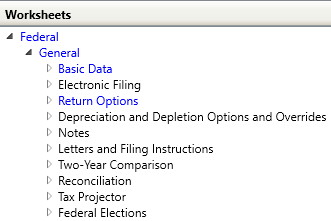
Worksheets are organized under Federal and State tax authorities and then by category. The tax authorities, categories, and worksheets that contain data display in blue font. In the following example, the General category consists of ten worksheets.
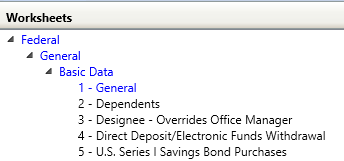
Worksheets are divided in numbered sections. Section numbering begins with the first section numbered 1 and increases sequentially for all sections in the worksheet. Data entry lines and grids in each section are also numbered sequentially. This numbering is independent of the section numbering and is reset for each section. The numeric indicators help identify the exact area of the worksheet when communicating with Customer Support.
In the following example, the Basic Data worksheet consists of five sections.
Government Forms
Government forms are also organized under Federal and State tax authorities. Some government forms are grouped under a common category. As with worksheets, the tax authorities, categories, and forms that contain data display in blue font.
You can enter data in some government form fields directly or by using the override feature. Some government form fields correlate to more detailed input forms. To display a detailed input form, select an applicable government form field and click Expand in the Navigation group on the Home tab. The detailed form opens in a new window. See Expanding to Detail in Government Forms for more information. Drill down to originating tax data is available on certain federal government form fields. See Drilling Down to Source Data from Government Forms for more information.